/// Share this article
Imagine this.
You publish an important page on your website. It has been ranking well for months. Then one day, you search for the page on Google and discover something strange.
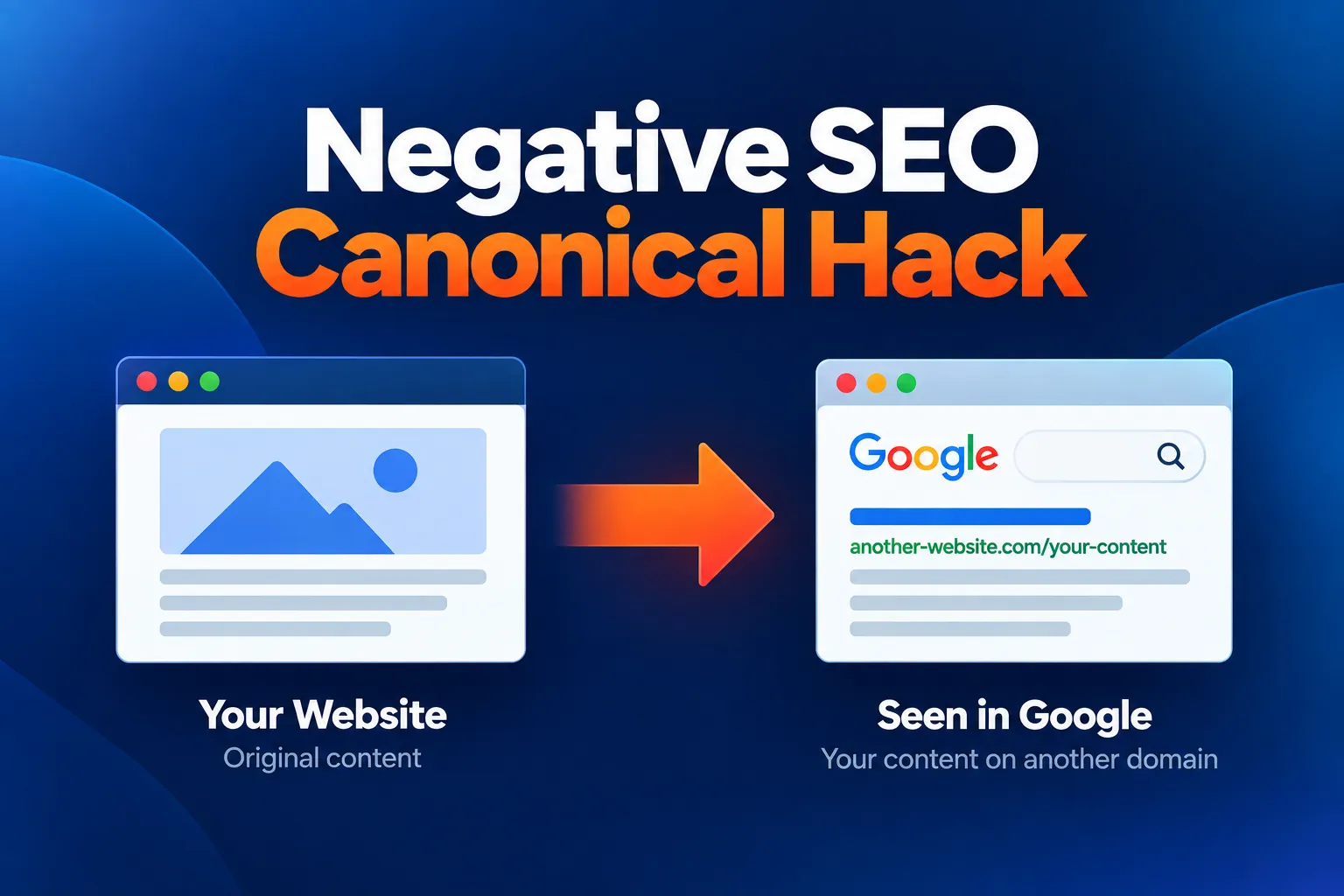
Another domain is showing your title, your description, your URL structure and almost your entire page content.
You click the result.
Instead of seeing the copied page, you are suddenly redirected somewhere else.
Your own website has not been hacked. Your server looks fine. Your CMS looks fine.
So what the hell is going on?
This is the kind of situation I encountered while working at The Search Agency, and it led us down a rather unusual SEO investigation involving scraped content, compromised websites, redirects, user-agent detection and canonical signals.
The technique is often described as a negative SEO canonical hack.
The important thing to understand, however, is that a canonical tag is not a magic switch that lets someone simply tell Google, “Ignore this website and rank mine instead.” Google treats canonical declarations as signals, not commands.
But Google does explicitly document malicious attacks involving cross-domain canonical tags and redirects, and says its systems may, in some circumstances, select the malicious or spammy URL instead of the URL on the compromised website.
So let’s look at what this attack actually looks like, how we encountered it, how you can investigate one today, and what has changed since the original case.
What Is a Negative SEO Canonical Hack?
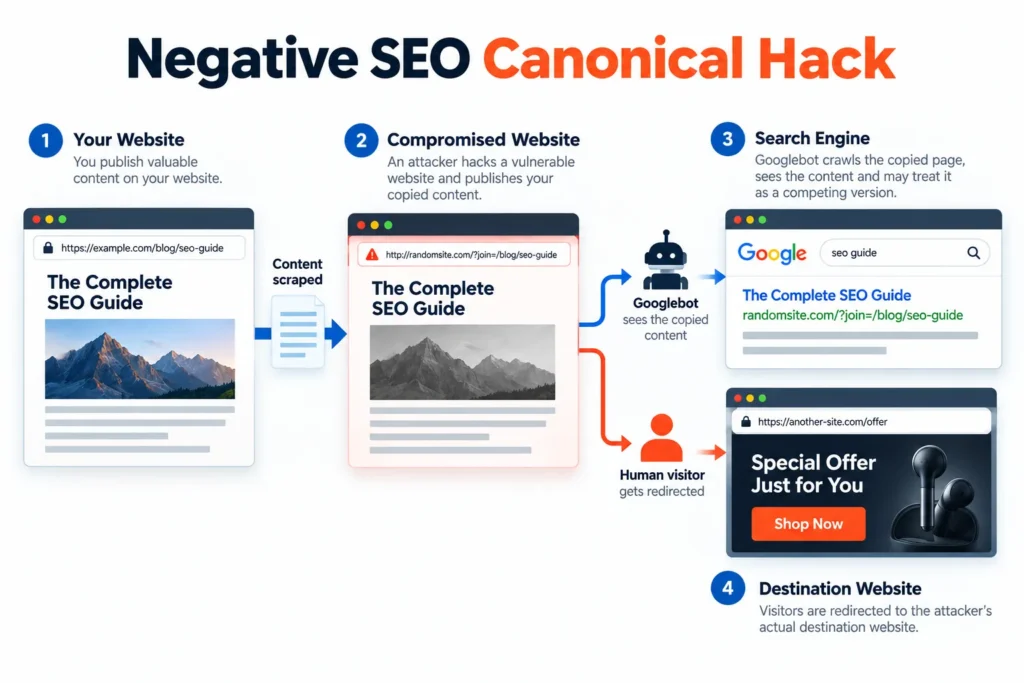
A negative SEO canonical hack is a term used to describe an attack in which an attacker tries to manipulate how search engines understand the relationship between your original content and a copied version hosted elsewhere.
A typical scenario can involve:
- Your content being scraped.
- A vulnerable third-party website being compromised.
- Your content being published on that compromised website.
- Canonical or redirect signals being manipulated.
- Search engines being shown the copied content.
- Human visitors being redirected somewhere else.
The goal is generally to interfere with search engines’ understanding of which URL represents the original content.
There is an important distinction here.
A canonical tag is only one signal.
Google says that canonicalization involves multiple signals, including redirects, sitemaps and rel="canonical" annotations. Google ultimately chooses the canonical URL algorithmically. A site owner’s declared canonical is not guaranteed to be selected.
That means seeing an external canonical URL is not automatically proof of a negative SEO attack.
It is a reason to investigate.
How a Negative SEO Canonical Hack Works
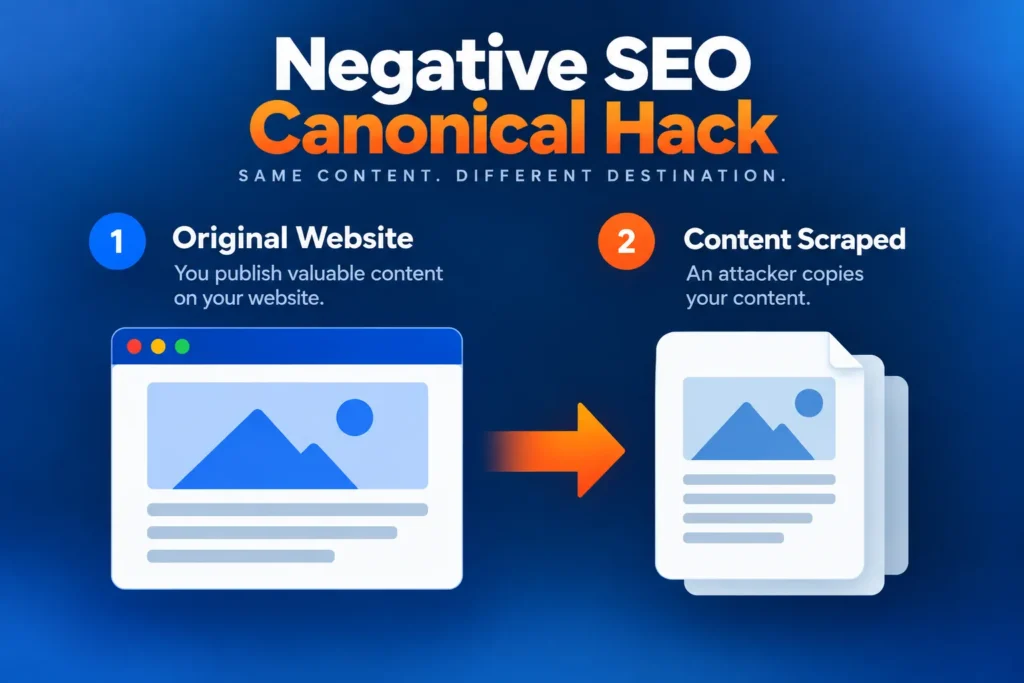
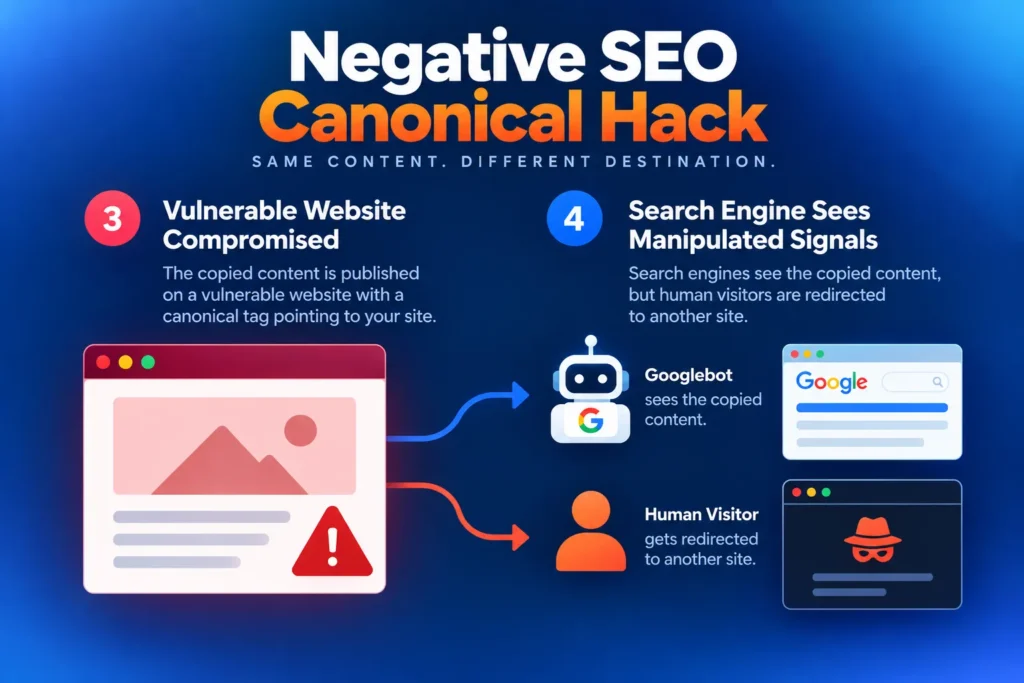
The easiest way to understand the concept is to follow the attack from beginning to end.
1. Your website is crawled and your content is copied
The attacker first obtains content from the target website.
This could include:
- Page titles
- Meta descriptions
- Headings
- Body content
- URL structures
- HTML
- Images
- Internal links
- CSS
- Other page elements
The attacker may not need access to your website at all.
This is an important point.
Your website can remain completely secure while your content is being used in the attack.
2. The attacker finds a vulnerable website
The attacker then looks for another website with a security vulnerability.
It might be an old CMS installation, an outdated plugin, compromised hosting account or another poorly secured website.
The attacker gains control of the site and uses it as an intermediary.
I call this the middleman website because it sits between the original website and whatever destination the attacker ultimately wants the visitor to reach.
3. The copied content is published on the compromised website
The attacker creates pages on the compromised website containing copies of your content.
The URLs may even imitate the structure of the original website.
For example:
| Original website | Compromised website |
|---|---|
example.com/services/web-design/ | randomsite.com/?join=/services/web-design/ |
example.com/about-us/ | randomsite.com/?join=/about-us/ |
example.com/blog/seo-guide/ | randomsite.com/?join=/blog/seo-guide/ |
The exact URL structure can vary.
The important part is that the attacker is trying to make the copied page look sufficiently similar to the original page for search engines to treat the two as related or duplicate content.
4. Canonical signals are manipulated
This is where the canonical aspect comes into play.
A canonical annotation tells search engines which URL a page owner considers to be the preferred version among duplicate or very similar URLs.
For example:
<link rel="canonical" href="https://example.com/original-page/" />Google describes rel="canonical" as one of the signals it considers when determining which URL should be treated as canonical. It is not an absolute instruction.
In a malicious scenario, an attacker may inject a cross-domain canonical or other signals into the compromised website.
Google specifically documents malicious attacks where hackers inject a cross-domain rel="canonical" annotation or an HTTP 3xx redirect, potentially causing Google’s systems to select the malicious or spammy URL instead of the URL on the compromised website.
That is considerably more nuanced than saying:
“Someone adds a canonical tag and Google automatically deindexes your website.”
That is not how Google’s current documentation describes canonicalization.
5. Googlebot and human visitors may see different things
This is another particularly interesting part of the attack.
The compromised page may be configured so that:
- Googlebot receives the copied content.
- A normal visitor receives a redirect.
- Visitors arriving from Google may be treated differently.
- Certain devices or referrers may receive different responses.
This type of behavior falls into the broader category of cloaking when it is deliberately used to show different content to search engines and users for ranking manipulation. Google also notes that hacked websites commonly use cloaking and user-agent or referrer-dependent redirects.
So the page you see in your browser may not be the same page Google encounters.
And that’s where these investigations can get really weird.
A Simple Example of the Attack
Here’s the conceptual flow:
Your website
↓
Your content is scraped
↓
Compromised third-party website
↓
Copied version of your page is published
↓
Canonical / redirect / other signals are manipulated
↓
Google crawls the compromised page
Meanwhile:
Human visitor
↓
Visits the compromised URL
↓
JavaScript or server-side redirect
↓
Attacker’s destination website
The compromised website is effectively being used as a technical middleman.
IMAGE SUGGESTION
I strongly recommend creating one custom diagram for this section.
A simple 4-column or horizontal flow diagram would make this article much easier to understand:
Your Website → Scraped Content → Compromised Middleman → Google
And underneath the middleman:
Googlebot → copied page / manipulated signals
Human visitor → redirect → destination website
This is much more useful than a generic “SEO hacking” stock image.
Our Experience With a Negative SEO Canonical Hack
This is where the subject became particularly interesting for me.
While working at The Search Agency, we noticed something unusual in Google’s search results for a client.
This was one of the kinds of technical SEO investigations that shaped how I approach website problems today.
I’ve spent more than two decades working across SEO, web development and digital marketing, so I’ve learned to look beyond the obvious symptom when something goes wrong.
The client’s own page appeared to have been replicated somewhere else.
But this wasn’t just an ordinary scraper.
The strange part was the combination of signals.
The unfamiliar domain was showing:
- The same page title
- A very similar description
- The client’s directory structure
- The client’s content
- A page that looked like a copy of the client’s website
Yet when the unfamiliar result was clicked, the visitor was redirected elsewhere.
That immediately raised questions.
Was the client’s website hacked?
Was Google seeing a different version of the page?
Was the other domain simply scraping the site?
Or was something more deliberate happening?
We started investigating.
The Client’s Website Had Not Been Hacked
This distinction turned out to be extremely important.
The target website itself wasn’t compromised.
Its content had been copied.
The compromised website was somewhere else.
That gave us a situation that looked roughly like this:
| Component | What happened |
|---|---|
| Client website | Not hacked |
| Client content | Scraped |
| Third-party website | Compromised |
| Copied content | Published on compromised website |
| Search engines | Exposed to the copied version |
| Human visitors | Redirected |
| Other suspicious links | Also discovered during investigation |
This is one of the reasons these attacks can be difficult to diagnose.
A website owner naturally starts by asking:
“Has someone hacked my website?”
Sometimes the answer is no.
The attack may be happening around your website rather than inside it.
We Found the Same Page Structure on Another Domain
One of the clues was the unusual similarity between the client’s legitimate URL structure and the URLs appearing on the unfamiliar domain.
The pages weren’t simply generic copies.
The URL patterns themselves appeared to be constructed around the client’s directory structure.
That made the situation much more suspicious.
We investigated the HTML and discovered that the page being served to search engines contained a copy of the client’s content.
The page also behaved differently depending on who was requesting it.
A normal visitor could be redirected while a search-engine crawler could encounter the copied content.
That behavior is particularly important because Google explicitly recognizes user-agent, referrer and device-dependent redirects as something that can occur with hacked websites.
We Found More Than One Compromised Website
The investigation didn’t stop with a single domain.
We found additional compromised websites being used in a similar way.
At that point, it became clear that this wasn’t simply a random website scraper copying a few paragraphs of content.
There was a broader pattern involving:
- Scraped content
- Compromised websites
- Search-engine crawling
- Redirect behavior
- Canonical signals
- Suspicious backlinks
That combination is what made the case particularly interesting.
Did the Canonical Hack Cause the Traffic Drop?
This is where I would be careful with the wording today.
The original investigation showed a significant traffic decline around the period in which the suspicious activity was discovered.
That made the attack an important part of the investigation.
But an SEO traffic chart by itself does not prove that a specific canonical manipulation caused every part of the decline.
Search traffic can fall for many reasons:
- Algorithm changes
- Technical problems
- Indexing changes
- Competition
- Seasonality
- Website changes
- Manual actions
- Security problems
- Content changes
- Canonicalization problems
So if you encounter a similar situation, treat the traffic decline as a symptom, not automatically as proof of causation.
That’s an important lesson from looking back at older SEO investigations with today’s understanding.
Does a Negative SEO Canonical Hack Still Work in 2026?
The short answer is: the underlying type of attack is still relevant, but you should not assume the old mechanism works exactly as it did years ago.
Google’s current documentation explicitly discusses malicious hacking involving:
- Cross-domain
rel="canonical"annotations - HTTP 3xx redirects
- Malicious or spammy destination URLs
Google says its algorithms may choose the malicious or spammy URL instead of the URL on the compromised website in these circumstances.
At the same time;
Google makes it clear that canonicalization is algorithmic. A canonical tag is a signal, not a command.
Google explains the canonicalization process in more detail in its documentation on how it selects a representative URL from duplicate pages.
Google considers multiple signals when choosing a canonical URL, and its selected canonical can differ from the URL declared by the site owner.
So I would not describe the attack as:
“Put a canonical on another website and Google will automatically remove your page.”
That’s far too simplistic.
A better description is:
An attacker may attempt to manipulate Google’s canonicalization and indexing signals by placing copied content and malicious canonical or redirect signals on a compromised third-party website.
That is both more accurate and more useful.
How to Detect a Possible Canonical Attack
If you suspect that someone is trying something unusual with your content, don’t start by panicking.
Start collecting evidence.
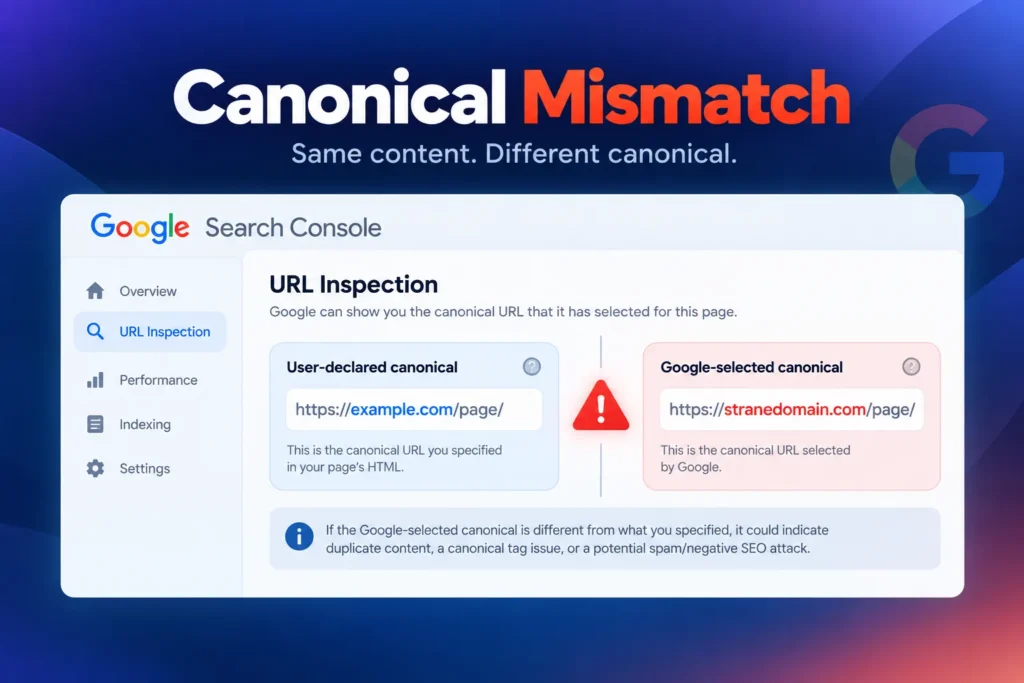
1. Check Google Search Console URL Inspection
This is probably the first place I would look.
Google Search Console’s URL Inspection tool lets you examine the indexed version of a URL and, among other things, see the user-declared and Google-selected canonical.
Look at:
- Indexing status
- User-declared canonical
- Google-selected canonical
- Last crawl
- Crawled page
- Rendered page
- JavaScript output where relevant
Google’s URL Inspection tool specifically provides the User-declared canonical and Google-selected canonical fields. Google also warns that the live test cannot predict canonical selection because canonicalization is determined from indexed data.
If Google has selected an unexpected external URL, that deserves investigation.
It does not, by itself, prove that you’ve been attacked.
Google also documents situations involving malicious hacking, cross-domain canonical annotations and redirects, so an unexpected external canonical is worth investigating rather than simply ignoring.
2. Search for exact sentences from your page
Take a distinctive sentence from the affected page and search for it in Google using quotation marks.
For example:
"your unique sentence from the page"Try several distinctive sentences.
You can also use searches such as:
site:example.com "unique sentence"and search without the site: restriction to discover copies elsewhere.
If you find dozens or hundreds of copies, you may be dealing with ordinary scraping.
If you find a small number of highly unusual copies combined with redirects, manipulated canonicals or hacked domains, investigate further.
3. Check whether Google selected another canonical
This is one of the most important checks.
Suppose your page is:
https://example.com/services/web-design/But Search Console reports a Google-selected canonical such as:
https://strangedomain.com/?page=web-designThat is worth investigating.
Google’s documentation specifically says that the Google-selected canonical can differ from the user-declared canonical, and the URL Inspection report is where you can see that selection.
Again, unexpected does not automatically mean malicious.
You need to examine the competing page and the signals around it.
4. Inspect your actual HTML
Check the source code of the affected page.
Look for:
<link rel="canonical" ...>Also inspect:
- HTTP response headers
- SEO plugin settings
- CMS templates
- Theme files
- Server configuration
- Redirect rules
- JavaScript
- Recently modified files
You are trying to answer a simple question:
Is my website declaring the wrong canonical, or is the strange canonical coming from somewhere else?
5. Check for redirects
Test the affected URLs from different situations.
For example:
- Direct browser visit
- Google Search result
- Different browser
- Logged-in vs logged-out
- Mobile vs desktop
- Different referrer
Be careful here.
You don’t need to imitate an attacker. You are simply trying to establish whether the URL behaves differently under different conditions.
Google specifically documents hacked redirects that can vary according to referrer, user agent or device.
6. Check your backlinks
Open the Links report in Google Search Console and look for unusual domains or patterns.
Google’s Links report can show sites linking to you, although Google describes it as a sample rather than a comprehensive list of every backlink.
Look for patterns such as:
- Large numbers of unrelated domains
- Hacked-looking websites
- Strange anchor text
- Links appearing suddenly
- Links to unusual URLs
- Repeated links from compromised websites
But don’t make another common SEO mistake here:
Don’t assume every strange backlink is causing your ranking problem.
Google ignores many spammy links automatically.
The existence of weird links and the existence of a canonical/indexing problem are two separate things that should be investigated separately.
How to Fix a Canonical or Hacking Problem
The correct response depends on where the problem actually exists.
If Your Website Has Been Hacked
Treat it as a security incident first and an SEO incident second.
You should:
- Take appropriate containment steps.
- Change compromised passwords and credentials.
- Enable multi-factor authentication.
- Update your CMS, plugins and themes.
- Remove unauthorized users.
- Scan the website and server.
- Check modified files.
- Check the database.
- Inspect redirects.
- Check for injected JavaScript.
- Check Search Console for security issues.
- Review the site after cleanup.
- Request reindexing where appropriate.
Google’s documentation notes that hacked websites can contain injected code, new spam pages, manipulated content and malicious redirects.
If Your Website Was Not Hacked but Your Content Was Copied
This is a different situation.
You may need to:
- Document the copied pages.
- Record the URLs.
- Record dates and screenshots.
- Identify the hosting provider.
- Contact the website owner if appropriate.
- Contact the hosting provider if the site itself appears compromised.
- Investigate copyright-removal options where applicable.
- Report malicious behavior through appropriate Google channels.
- Continue monitoring your own site.
There is an interesting wrinkle here.
The owner of the compromised website may also be a victim.
If someone hacked a small business website and used it to copy your content, attacking the website owner may be the wrong response.
They may have no idea what is happening.
What About Disavowing the Links?
This is an area where older SEO advice can become outdated very quickly.
Finding suspicious links does not automatically mean you should rush to Google’s disavow tool.
Google has repeatedly explained that many unnatural or spammy links are handled automatically.
The important question is what role those links actually play in the problem.
If you have a serious unnatural-link situation, particularly one involving links that were deliberately created for your site, investigate the circumstances before deciding whether disavowal is appropriate.
Don’t turn:
“I found weird backlinks”
into:
“I need to disavow 50,000 domains immediately.”
Those are two very different conclusions.
What If Google Has Selected the Wrong Canonical?
This requires a slightly different approach.
First, determine whether Google is actually seeing two substantially similar pages.
Then compare:
| Check | What you want to know |
|---|---|
| User-declared canonical | What does your site say is the preferred URL? |
| Google-selected canonical | What URL did Google choose? |
| Page content | Are the pages actually duplicates or very similar? |
| Redirects | Is one URL redirecting to another? |
| Sitemap | Which URL are you submitting? |
| Internal links | Which version does your website consistently link to? |
| External copy | Is another domain hosting your content? |
| Server response | Is the correct content being returned? |
Google’s own documentation recommends comparing the user-declared canonical with the Google-selected canonical when investigating canonicalization problems.
The goal is not to force Google to accept a canonical tag.
The goal is to make the overall set of signals unambiguous.
How to Prevent This From Happening
You can’t prevent somebody from copying content from a publicly accessible website.
But you can make your own website considerably harder to compromise and much easier to monitor.
That starts with getting the technical foundation right, from the CMS and hosting environment to redirects, canonical tags and overall site architecture.
A properly planned website should treat these technical foundations as part of the build, not as an afterthought.
Keep your website technically maintained
At minimum:
- Keep your CMS updated.
- Keep plugins updated.
- Remove abandoned plugins.
- Remove unused themes.
- Use strong unique passwords.
- Enable MFA wherever available.
- Limit administrator accounts.
- Use reputable hosting.
- Monitor unexpected changes.
- Keep reliable backups.
- Monitor Search Console.
Security isn’t a one-time installation.
It’s an ongoing process.
Monitor more than just rankings
Most website owners watch one thing:
“What’s my ranking?”
That’s useful, but it’s not enough.
A better monitoring system watches several signals.
| What to monitor | Why it matters |
|---|---|
| Organic traffic | Can reveal sudden changes |
| Search queries | Shows changes in visibility |
| Indexed pages | Can reveal unexpected pages |
| Google-selected canonicals | Can reveal canonicalization anomalies |
| Search Console security issues | Can reveal certain compromises |
| Backlinks | Can reveal unusual link activity |
| Server logs | Can reveal suspicious requests |
| Redirects | Can reveal malicious behavior |
| Website source code | Can reveal injected code |
| Uptime/server errors | Can reveal technical problems |
Search Console’s reporting tools can help investigate indexing and search-performance changes, while URL Inspection provides page-level information about Google’s indexed version of a URL.
The Biggest Lesson From This Case
The most interesting thing about this type of attack isn’t actually the canonical tag.
It’s the fact that your website doesn’t necessarily have to be hacked for somebody to create an SEO problem around it.
Your content can be copied.
Another website can be compromised.
That compromised website can be used to host the copied content.
Search engines can encounter manipulated signals.
Visitors can be redirected somewhere else.
And by the time you notice something is wrong, several different technical systems may be involved.
That’s why SEO troubleshooting needs to go beyond:
“My rankings dropped.”
The better question is:
“What changed, what is Google seeing, and what evidence can I find?”
This is also something I’ve written about from the broader client-agency perspective: when you’re responsible for SEO performance, you need access to the technical information and control necessary to actually investigate what is happening.
That’s the mindset that helped us investigate this case in the first place.
Final Thoughts
The phrase “negative SEO canonical hack” makes the attack sound almost like a secret weapon that can instantly steal somebody else’s rankings.
Reality is considerably messier.
Canonicalization is algorithmic. A rel="canonical" tag is a signal, not a guarantee. Google can choose a different canonical based on the broader set of signals it sees.
At the same time, this isn’t just an SEO conspiracy theory.
Google’s own documentation specifically describes malicious attacks involving cross-domain canonical annotations and redirects, including situations where Google’s systems may select the malicious or spammy URL instead of the URL on the compromised website.
The practical lesson is simple:
Don’t panic when you find a strange canonical. Investigate it.
Check Search Console.
Compare the user-declared and Google-selected canonicals.
Look for copied content.
Inspect redirects.
Check your source code and server responses.
Look for evidence of hacking.
And most importantly, don’t assume that every strange SEO symptom has one obvious cause.
Sometimes the most important clue isn’t on your website at all.
Originally investigated while I was working at The Search Agency. This article has been updated for 2026 with current Google documentation and modern troubleshooting guidance.
/// Share this article
/// More web design reading